 Toner Cartridges
 Ink Cartridges
 P-Touch Label Tapes
 Thermal Labels & Rolls
 Toner Cartridges
 Ink Cartridges
 DYMO Label Rolls
 DYMO Label Tapes
 Toner Cartridges
 Ink Cartridges
Hot
Our Store Located: 23C James Road Manurewa Auckland
Cell No: 0221562297
$10.43 Incl Gst
Out of stock
Out of stock
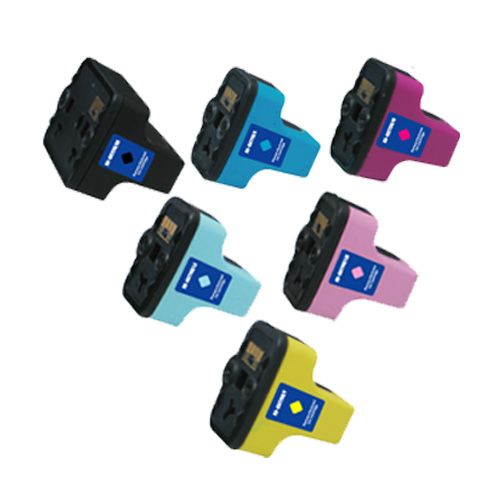
HP 02 yellow ink NZ is a compatible replacement cartridge for supported HP printers using the HP 02 yellow cartridge family. Yellow works with cyan, magenta and black to create colour output, making the correct cartridge reference important for reliable printer operation. This cartridge is suited to everyday colour documents, graphics, images and general home or office printing where the HP 02 yellow specification is required.
This HP 02 yellow ink cartridge is intended for supported HP printers specifying HP 02 yellow. Because HP uses different cartridge families across its printer range, confirm the exact printer model and the cartridge reference shown on your current supply before ordering. If you are unsure, use the printer documentation or official HP support information to verify the correct cartridge.
| Cartridge family | HP 02 |
|---|---|
| Colour | Yellow |
| Type | Compatible ink cartridge |
| Use | Colour printing on supported HP printers |
| Replacement | Single yellow cartridge |
The HP 02 yellow ink NZ cartridge supplies the yellow channel of the printer’s colour system. Actual page output depends on document coverage, image content, printer settings, paper and printer condition. Replacing only the depleted colour can be useful when the other cartridges still contain usable ink.
Genuine HP ink is manufactured and sold by HP. A compatible HP 02 yellow cartridge is a third-party replacement designed for printers using the specified HP 02 reference. A compatible cartridge can provide a value-focused alternative for routine printing, provided the printer model and cartridge code are correctly matched.
Find the printer model on the device label, control panel or computer settings. Check the existing yellow cartridge and compare its family and reference with the product information. Do not choose a cartridge based on colour alone, as different HP cartridge families can use similar yellow specifications.
Keep the cartridge sealed until it is needed. Follow the manufacturer’s normal installation procedure, handle the cartridge carefully and avoid touching electrical contacts or ink outlets. Allow the printer to complete recognition, cleaning or alignment if requested, then print a test page. Store spare cartridges away from excessive heat, direct sunlight and contamination.
Visit the Inkshop NZ shop, browse ink cartridges, read the printer ink and toner buying guide, or use the printer ink and toner FAQ.
For official printer and cartridge information, visit HP New Zealand.
Confirm your exact printer model and HP 02 yellow cartridge reference before ordering. Once matched, this reliable compatible HP 02 yellow ink NZ cartridge is a practical replacement for supported printers. Order online from Inkshop New Zealand.
In stock
In stock
In stock
In stock
In stock
In stock
In stock
In stock
In stock
In stock
No account yet?
Create an Account